

WhatsApp Chatbot for Business: What It Can Do, What It Costs, and Where It Falls Short
October 15, 2026
Progressive Web App vs Native App: Which One Does Your Business Need?
October 19, 2026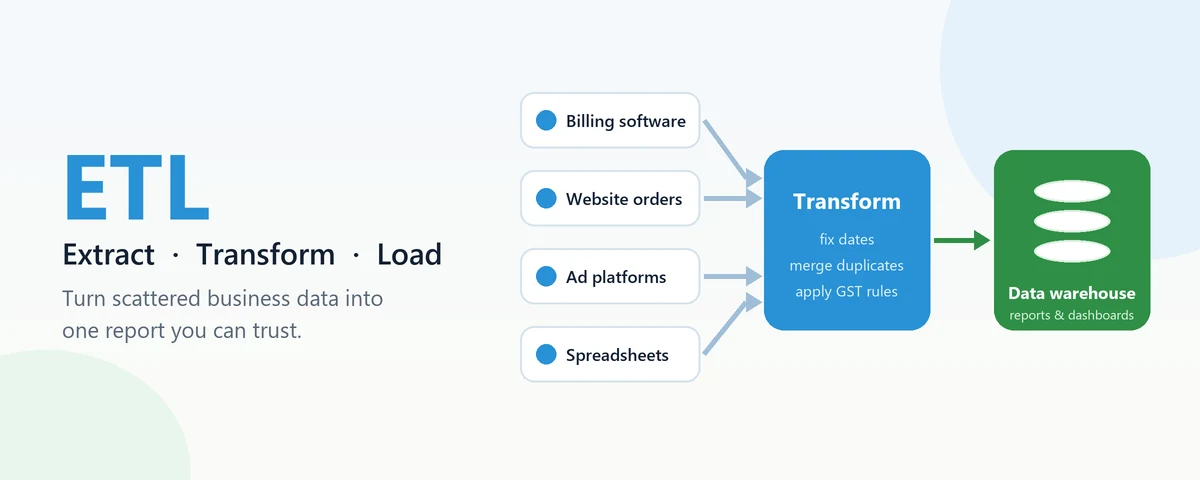
Picture a garment business with three showrooms. Sales sit in the billing software at each store, online orders come through the website, and ad spend lives in Google Ads. Every Monday someone exports five spreadsheets, copies them into one, fixes the dates that came out in the wrong format, removes duplicate customers and emails the owner a report by lunchtime, if nothing goes wrong. ETL is the name for doing that job automatically and reliably. This guide explains what ETL means in plain language, how it differs from ELT, how to think about ETL tools, and where pipelines usually break.
What ETL Means, Step by Step
ETL stands for extract, transform, load. It is the process of pulling data out of the systems where it is created, cleaning and reshaping it, and putting it somewhere it can be analysed together. Google Cloud’s overview of ETL describes the same three stages if you want a second explanation.
- Extract means reading data from each source: a billing database, a CRM, a spreadsheet on a shared drive, an API from an ad platform. The extract step has to cope with each source’s quirks, such as an API that only returns 1,000 rows at a time.
- Transform is where most of the real work happens. Dates written as 05/10/2026 in one system and 2026-10-05 in another are made consistent. “Mathura”, “mathura ” and “MATHURA” become one city. Prices that include GST are separated from those that do not. The same customer, entered twice with slightly different names but one phone number, is merged.
- Load writes the cleaned data into its destination, usually a data warehouse, where reports and dashboards read from one consistent copy instead of five spreadsheets.
The point of ETL is not the technology. It is that the Monday report is correct, arrives on time, and does not depend on one person remembering every manual fix.
ETL vs ELT: Which Order Makes Sense?
ELT swaps the last two steps. Raw data is loaded into the warehouse first and transformed there afterwards, usually with SQL. This became popular because cloud warehouses such as BigQuery and Snowflake can process large amounts of data cheaply, so it is often simpler to land everything and clean it inside the warehouse.
Classic ETL still has good reasons to exist. If sensitive fields such as Aadhaar numbers or medical details must be masked before they leave the source system, transforming first is the safer design. The same goes for a small destination database that should only receive tidy, summarised data. In practice most projects we see are a mix: light cleaning on the way in, heavier modelling inside the warehouse. Choosing the order is a design decision, not a matter of which acronym is newer.
The Main Types of ETL Tools
Lists of “best ETL tools” are not very useful, because the tools solve different parts of the problem. It helps more to know the categories.
| Type | Examples | Good for | Watch out for |
|---|---|---|---|
| Ready-made connectors | Fivetran, Airbyte | Copying data from popular apps without writing code | Usage-based pricing that grows with data volume |
| Cloud provider services | AWS Glue, Azure Data Factory, Google Cloud Dataflow | Teams already committed to one cloud | Tying your pipelines closely to that cloud |
| Transformation tools | dbt | Managing SQL transformations inside the warehouse, with testing | Handles the T only; something else must extract and load |
| Schedulers and orchestration | Apache Airflow | Running many steps in the right order, with retries and alerts | Needs someone comfortable running and maintaining it |
| Enterprise suites | Informatica, SQL Server Integration Services (SSIS) | Large organisations with existing licences and many systems | Licence cost and a steeper learning curve |
| Custom scripts | Python with a scheduler | Unusual sources, such as a local billing system with no API | Becomes fragile if nobody documents or monitors it |
Many working setups combine two or three of these, for example a connector to bring data in, dbt to model it, and a scheduler to run the whole thing every night.
How to Choose ETL Tools for a Growing Business
Before comparing ETL tools by feature lists, answer five plain questions about your own situation.
- Where does the data live? If your sources are well-known cloud apps, ready-made connectors probably exist. If one of them is a desktop billing program in the back office, you will need something custom for that piece.
- How fresh does it need to be? A sales report updated every morning is a very different, and much cheaper, problem from a stock figure that must be correct to the minute.
- Who will look after it? A tool your team cannot maintain is a liability the day the person who set it up leaves.
- How is it priced? Some tools charge by rows or data volume. That looks cheap in a trial and can grow quickly once a busy source is connected.
- How hard is it to leave? Prefer setups where your transformation logic is readable SQL or code you own, not hidden inside one vendor’s screens.
Where ETL Pipelines Usually Break
- A source system changes. Someone renames a column in the billing software, and the next run quietly loads nothing into that field.
- Failures go unnoticed. A job that fails at 2 am without sending an alert means the morning report shows yesterday’s numbers as if they were today’s.
- Time zones and dates. Ad platforms often report in UTC while your shops close at 9 pm IST, so a day’s sales can split across two dates.
- Loading the same data twice. A re-run after a failure doubles the sales figures unless the pipeline is built to replace data instead of adding to it.
- Expired passwords and API keys. They expire on schedule, usually when the person who set them up is on leave.
None of these are exotic. They are why monitoring and simple data checks, such as “today’s row count should be within 20% of last Monday’s”, matter as much as the pipeline itself.
A Sensible First ETL Project
Start with one report that people already rely on and currently build by hand, such as daily sales by store. Connect only the sources that report needs, agree on the definitions (does “sales” include returns? GST?), automate it, and run it alongside the manual version for two weeks until the numbers match. Then add the next source. One honest caveat: the first project often takes longer than expected, not because of the tooling, but because it surfaces disagreements about what the numbers should mean. That conversation is worth having anyway.
Where Inverosoft fits in
Our team builds data pipelines and warehouses, including on Google BigQuery and Snowflake, and we help teams decide how much of the work belongs in ready-made tools and how much needs custom code. If ETL is new to your business, our guide to data warehouses explains where the data ends up, and our database migration guide covers moving older systems across. To talk about your own reports, get in touch.
Frequently Asked Questions
Is ETL the same as a data pipeline?
ETL is one kind of data pipeline. “Data pipeline” is the broader term for any automated flow of data between systems, including real-time streams and simple copies that involve no transformation.
Do I need ETL if my business runs on Excel?
Not necessarily. If one person can build the reports you need in an hour a week, ETL may be more than you need. It becomes worth it when the manual work grows, mistakes creep in, or several people need the same numbers.
Is ETL done with code or with tools?
Both, and usually a mix. Tools handle common sources and scheduling well, while code fills the gaps for unusual sources and business rules that tools cannot express cleanly.
How long does a first ETL setup take?
A focused first project with two or three sources can often be running within a few weeks. Agreeing on definitions and checking numbers against the existing reports usually takes longer than the technical build.
ETL sounds like specialist jargon, but the idea is simple: get your numbers from where they are created to where decisions are made, cleanly and without manual copying. If you are spending your Mondays in spreadsheets, talk to us about automating the first report.


